Why Not Results – Podcast Studio in Phoenix

How to Use AI Website Tools Safely Without Creating Chaos

AI website tools can help small businesses move faster with content updates, page improvements, blog drafts, homepage edits, and marketing workflows. But without a safe review process, AI can also create confusion, inaccurate copy, broken layouts, or rushed publishing decisions. The best approach is to use AI as a support tool while keeping backups, human review, testing, and approval in place before anything goes live.

The safest way to use AI for website updates is to treat it as a support tool, not a replacement for review. AI can help draft, organize, compare, and suggest improvements, but your team still needs backups, clear permissions, human review, and final approval before anything goes live.

Quick Answer

The safest way to use AI website tools is to let AI help with drafting, organizing, reviewing, and improving content while keeping humans in control of the final publishing decision. Start with one page or section, save a backup, ask AI for section-by-section recommendations, review the copy for accuracy and brand voice, test the layout, get approval, and document what changed before publishing.

Why AI Website Tools Feel So Powerful

AI tools can quickly review website copy, suggest clearer messaging, organize content changes, and help business owners see what needs to be updated. For a small business, this can be a major advantage because website work, content creation, and social media tasks often compete for the same limited time.

The real value of AI is not just that it writes faster. It helps organize messy information into a more usable workflow.

For example, a business can ask AI to compare current website copy against recommended improvements, organize changes by page section, and create a clean revision guide for a team member to review.

AI website tools workflow checklist for small business website updates

AI Can Organize Messy Website Ideas

Small business website updates often start with scattered notes, old page copy, customer feedback, service changes, and ideas from different team members.

AI can help organize those inputs into a clearer structure. It can turn rough ideas into page sections, headline options, service descriptions, calls to action, and revision notes.

This helps the team see what needs to be reviewed before changes are made.

AI Can Help Teams Move Faster

AI can reduce the time it takes to draft website updates, research content ideas, summarize page changes, and organize marketing tasks.

Instead of starting from a blank page, a team can use AI to create a first draft or a structured outline. Then a person can review the content, adjust the message, and confirm that it fits the business.

Speed Without a System Can Create Risk

The problem is that AI speed can make businesses feel comfortable moving too quickly. If an AI tool connects directly to a website or publishing system, one wrong setup can create confusion, security concerns, or changes that are difficult to review.

That is why speed should not be the only goal. A better goal is controlled speed.

AI should help with the heavy lifting, but the business still needs a process for backups, permissions, review, and final approval.

Fast Changes Can Create Website Problems

Website updates should not be rushed just because AI can create content quickly.

If the wrong copy is published, if a section is removed by mistake, if a page layout breaks, or if inaccurate information goes live, the business may create confusion for customers.

Fast content is helpful only when it is paired with a clear review process.

Direct Website Access Should Be Handled Carefully

Some AI tools may connect directly to WordPress or another website platform. That can be useful, but it should be handled carefully.

Before allowing any tool to connect to a website, the business should review permissions, backups, security settings, and approval steps.

The safest process keeps people in control of what gets published.

Safe AI website update process with backup review and approval steps

If your team needs help building a safer website content process, Why Not Results can help with website strategy, SEO, content planning, and AI-assisted marketing workflows.

The Safer Way to Use AI for Website Updates

A safer workflow starts with one page or one task at a time. Instead of asking AI to overhaul an entire website, ask it to review one page, identify what is currently there, and recommend improved wording section by section.

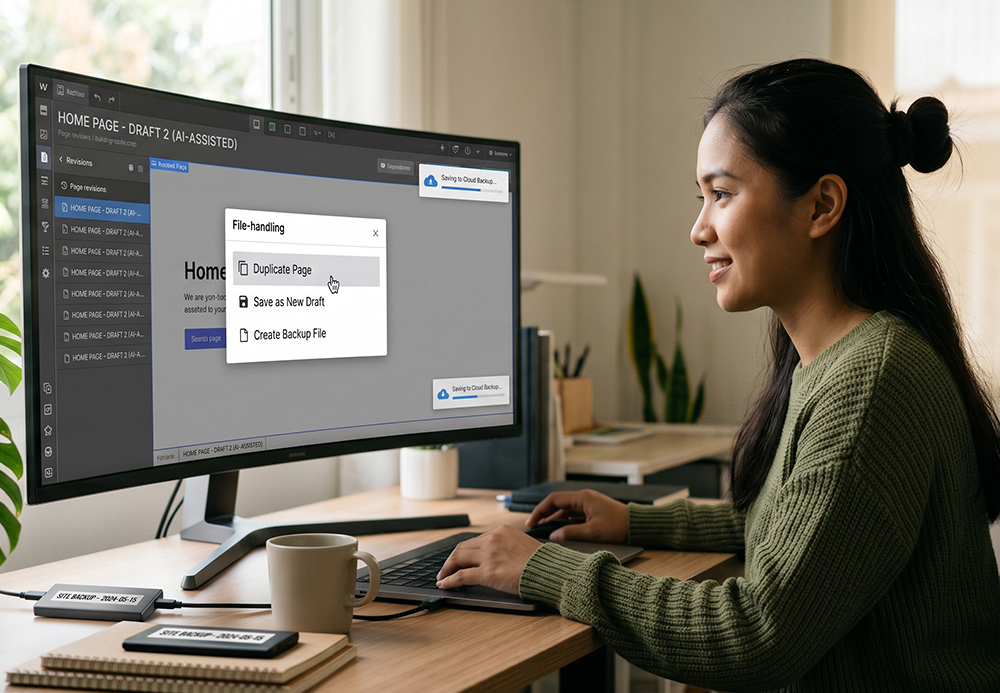
Before applying changes, duplicate the page or save the original version. This gives the team a fallback if something does not look right.

Then, have a person review the suggested copy, confirm the message is accurate, and publish only after the final review.

Start With One Page at
a Time

The safest starting point is one page, one section, or one content task.

For example, a business can begin with a homepage headline, a service page section, a frequently asked questions section, or a blog draft.

This keeps the workflow easier to review and reduces the risk of changing too much at once.

Create a Backup Before Testing Changes

Create a Backup Before Testing Changes

Before testing AI-assisted website changes, save the original version of the page.

This may mean duplicating the page, saving a draft, exporting the copy, or using a backup system. The goal is to make sure the team can restore the original version if something does not work.

A backup gives the team more confidence while testing improvements.

Review Everything Before Publishing

Small business team reviewing AI website updates before publishing

AI-generated copy should always be reviewed before it goes live.

The review should confirm that the message is accurate, the tone fits the brand, the offer is clear, the call to action works, and the page helps the customer understand what to do next.

AI can support the process, but a person should approve the final version.

AI Should Support Your Team, Not Replace Review

AI is best used as a support tool. It can draft, summarize, organize, compare, and speed up repetitive work. But it should not replace business judgment.

Your team still needs to decide whether the message fits the brand, whether the information is accurate, whether the call to action is clear, and whether the final page helps the customer understand what to do next.

Your Team Still Owns the Strategy

AI can suggest content, but the business still owns the strategy.

Your team needs to know who the page is for, what service is being promoted, what the customer needs to understand, and what action the visitor should take.

Without that direction, AI may create content that sounds good but does not support the business goal.

Human Review Protects Brand Voice and Accuracy

A person should review AI-assisted content for accuracy, tone, brand fit, and customer relevance.

This is especially important for service descriptions, pricing language, claims, calls to action, and any copy that could affect how customers understand the business.

Human review helps make sure the final content is useful, accurate, and safe to publish.

Checklists Make AI Workflows Repeatable

A checklist helps the team follow the same steps every time. For AI website updates, a simple checklist may include:
  • Choose one page or section
  • Save the original version
  • Ask AI for section-by-section recommendations
  • Review the copy for accuracy
  • Check the brand voice
  • Confirm the call to action
  • Test the page layout
  • Get final approval
  • Publish the update
  • Document what changed
This makes the workflow safer and easier to repeat.

Clear Steps Reduce Confusion

When the process is unclear, teams can waste time searching, guessing, or making inconsistent decisions.

Clear steps help everyone understand what to do, where to add information, who reviews the output, and when the work is complete.

This keeps AI from creating more chaos in the workflow.

Why Clear Checklists Matter

When teams are learning new tools, slow work is often a process problem, not just a people problem. If the team does not know what to check, where to enter information, or when to stop searching, the task becomes harder than it needs to be.

Checklists help remove guesswork.

For example, a social media research workflow should define what platforms to check, what details to collect, how to handle missing profiles, and where the final information should be saved.

Safe AI Website Workflow Checklist

Use this checklist before publishing AI-assisted website updates:

  1. Choose one page or section to improve.
  2. Save a backup of the original version.
  3. Ask AI for section-by-section recommendations.
  4. Review the copy for accuracy, tone, and brand fit.
  5. Check all links, buttons, forms, and images.
  6. Test the page on desktop and mobile.
  7. Get final approval before publishing.
  8. Document what changed.

This makes AI website updates safer, easier to review, and easier for your team to manage.

How Small Businesses Can Start

Start simple. Pick one repeatable workflow, such as homepage copy updates, blog formatting, social media research, or content repurposing.

Use AI to create the first draft or organize the information. Then have a person review and approve the final output.

Once that process works, document it and repeat it. Over time, the business can build a stronger system where AI handles more of the repetitive work and the team focuses on strategy, quality, and execution.

Choose One Repeatable Workflow First

Small businesses should not try to automate everything at once. A better starting point is one task that happens often, such as:
  • Blog formatting
  • Homepage copy updates
  • Service page revisions
  • Social media research
  • Content repurposing
  • FAQ creation
  • Caption drafting
  • Website copy review
Once one workflow is working well, the business can add more.

Document the Process Before Expanding

After the workflow works, document the steps.

This helps the team repeat the process without starting over each time. It also makes it easier to train team members, review work, and improve the system over time.

A documented AI workflow can help the business move faster while still keeping control.

How Phoenix Small Businesses Can Use AI Website Tools Safely

For Phoenix and Arizona small businesses, AI website tools can be useful for improving service pages, refreshing homepage copy, organizing blog ideas, creating social media content, and reviewing website messaging. The key is not to publish AI-generated content without a system.

A safe AI website workflow should include backups, clear permissions, brand review, accuracy checks, layout testing, and final approval. This helps small businesses move faster without risking confusing copy, unfinished edits, or off-brand messaging.

Final Thought

AI can help small businesses move faster, but only when it is paired with a safe workflow.

The goal is not to let AI take over your website or marketing. The goal is to build a system where AI creates momentum and people keep control of the final result.

When your team uses backups, review steps, checklists, and final approval, AI becomes a useful tool instead of another source of confusion.

Need help building a safer AI marketing workflow?
Visit https://whynotresults.com/ or call +1-602-851-4104.
Contact: Mario Lizarraga.

Reviewed by: Whynot Results Editorial Team

Frequently Asked Questions

AI can help draft and organize website updates, but a person should still review the changes before anything is published.
Start with one page, create a backup, ask AI for section-by-section recommendations, review the copy, and publish only after approval.
Direct connections can be useful, but they should be handled carefully with proper permissions, backups, and security review.
AI can help with drafts, research, content repurposing, website copy, social media ideas, and workflow organization.
People are needed to confirm strategy, brand voice, accuracy, customer relevance, and final approval.

Build a Safer AI Website Workflow


AI can help your business move faster, but it works best when it is supported by strategy, review, testing, and clear approval steps. If your website content, blog process, or marketing workflow feels scattered, Why Not Results can help you build a cleaner system.

Call +1-602-851-4104 or visit https://whynotresults.com/ to connect with Mario Lizarraga and the Why Not Results team.

LATEST EPISODES

SEO and Organic Social Media
05Mar

SEO and Organic Social Media

Confused by digital marketing? This guide breaks down SEO, paid search, organic social, and paid traffic. Learn when to use each channel and plan your budget.

Geofencing + AI Ad Tracking for Service Businesses (Podcast)
12Feb

Geofencing + AI Ad Tracking for Service Businesses (Podcast)

Learn how geofencing builds high-intent audiences and how AI + UTMs, GA4, and Search Console improve attribution, calls, and qualified leads.

Sales and Marketing Conversion
04Feb

Sales and Marketing Conversion

Comparing SEO, SEM, and DSP advertising shows distinct benefits for lead generation and marketing strategy, with each offering unique advantages in search engine optimization, paid search, and programmatic ad buying.…

SEO vs SEM vs DSP Advertising
18Dec

SEO vs SEM vs DSP Advertising

Comparing SEO, SEM, and DSP advertising shows distinct benefits for lead generation and marketing strategy, with each offering unique advantages in search engine optimization, paid search, and programmatic ad buying.…

YouTube Analytics and Audience Retention
15Dec

YouTube Analytics and Audience Retention

YouTube analytics and audience retention are key to understanding how viewers interact with your content. By measuring key moments and retention rates, you can improve viewer engagement and build a…

Social Media Analytics and Why Your Social Media Needs a Coach for Better Engagement
05Nov

Social Media Analytics and Why Your Social Media Needs a Coach for Better Engagement

Social media analytics and expert coaching are key to boosting your brand’s growth and engagement. Learn how professional social media coaches help you interpret data, refine strategies, and make well-informed…